Why pixel-art shadows look muddy: hue-shifted ramps
Darkening a base colour toward black and brightening it toward white is the fastest way to build a shading ramp—and the fastest way to make pixel art look muddy. Shifting shadows toward violet/blue and highlights toward warm yellow keeps every step readable inside a single 32-colour palette, without adding a single extra colour.
Why value-only shading looks flat and muddy
When you shade a colour by moving only its lightness slider—keeping hue fixed while pulling darks toward black and lights toward white—each step loses visual energy. Browns turn sludgy, reds turn dusty pink or rust, greens look greyish, and neutral iron becomes dead charcoal.
In real lighting, shadow and light rarely share the same colour temperature. A warm key light (sunlight, torchlight, candlelight) pushes lit planes toward yellow-orange, while ambient fill in the shadows leans cool blue or violet. Even in a tiny 48×48 sprite with four steps per material, moving the hue across that temperature axis gives surfaces depth that brightness alone cannot carry.
There is a second practical benefit for game assets: cool shadows across every material converge toward the same deep violet-blue family. Because the iron pot, wooden logs, green brew, and orange flames all share cool darks and warm lights, separate props sit naturally on the same dungeon floor instead of looking pasted in from different sheets.
Measured against two real 48×48 props
To test the effect cleanly without changing brightness, we took frame 0 of the Bubbling Cauldron (idle-green) and the Treasure Chest (closed-down) from Arcane Curiosities Vol.1 and built a strict value-only recolour of palette.mjs: every chromatic ramp locked its HSL hue and saturation to its midtone (w2, g2, r2, e2, b2, v2) while keeping each step’s exact HSL lightness, and the neutral iron ramp (n0–n5) became pure achromatic grey at the exact same Rec.709 luminance. The outline ink (#17121f) stayed identical.
On the cauldron, 946 of 1,238 opaque pixels (76.4%) differ between the value-only version and the real hue-shifted sprite (192 of the remaining pixels are the shared outline ink, and 100 sit on the midtone anchors). On the treasure chest, 622 of 910 opaque pixels (68.4%) differ. Even though every pixel carries the same lightness step, the iron body gains violet shadow depth, the green potion shifts from teal-dark (#173a3a, 180.0°) to yellow-green (#a4e37a, 96.0°), and the fire climbs from deep wine (#5c1a2e, 341.8°) to bright orange (#f89c3c, 30.6°).
Bubbling Cauldron (48×48, idle-green frame 0)

Value-only: same lightness per step, fixed midtone hue and pure grey iron

Hue-shifted: real palette.mjs sprite (cool violet shadows, warm highlights)

Pixel diff: 946 of 1,238 opaque pixels (76.4%) change hue off flat value
Treasure Chest (48×48, closed-down frame 0)

Chest: value-only recolour (sludgy wood, flat grey iron bands)

Chest: real palette.mjs render (plum wood shadows, violet-tinted iron)

Pixel diff: 622 of 910 opaque pixels (68.4%) shift hue
All 7 ramps in palette.mjs measured in HSV hue (top bar: flat value-only reference; bottom bar: actual hue-shifted ramp).
One 32-colour master palette with semantic aliases
All 72 props across Arcane Curiosities Vol.1–6 draw strictly from one 32-colour file: palette.mjs. It defines a single dark violet ink (#17121f) plus seven hue-shifted ramps: neutral iron/stone (n0–n5, 6 steps), wood/leather (w0–w4, 5 steps), and five 4-step accents for brass (g), fire (r), green brew (e), blue mana (b), and arcane violet (v).
Notice two structural details in the file. First, g3 (#fff1a8) doubles as both the brightest brass glint and the white-hot flame core (fl3), reusing a colour across ramps rather than minting a new slot. Second, props refer to variable effects through semantic aliases (brew0..3, glow0..3, fl0..3). When a cauldron renders a violet or blue potion variant, rampSwap() substitutes an entire hue-shifted master ramp at once—so colour variants keep proper shadow-to-highlight hue travel and never break the 32-colour budget.
palette.mjs lines 1–20: the complete 32-colour MASTER table. Every ramp shifts hue across its steps—from cool violet/blue shadows to warm highlights.
// Arcane Curiosities — the one master palette (32 colours). Every prop is drawn only from these.// Ramps are hue-shifted: shadows lean violet/blue, lights lean warm. Key light: top-left, warm.// Brew/crystal colour variants swap WHOLE ramps (e.g. brew0..3 -> violet ramp); the hexes stay inside this set.export const MASTER = { ink: "#17121f", // neutral: iron, stone, bone, paper (cool violet shadow -> warm cream light) n0: "#2b2436", n1: "#443a52", n2: "#655a73", n3: "#8f8496", n4: "#bdb2b6", n5: "#ece3d6", // wood & leather w0: "#3b2229", w1: "#5f3530", w2: "#8a5237", w3: "#b77d4a", w4: "#e2b17a", // brass & gold (g3 doubles as the white-hot flame core) g0: "#7a4a1f", g1: "#b8802c", g2: "#e6b84a", g3: "#fff1a8", // fire & blood r0: "#5c1a2e", r1: "#a8323a", r2: "#e0603a", r3: "#f89c3c", // green: brew, poison, moss e0: "#173a3a", e1: "#26694f", e2: "#47a35a", e3: "#a4e37a", // blue: mana, glass, ice b0: "#1c2656", b1: "#2d5aa0", b2: "#4aa6dc", b3: "#a6ecf2", // violet: arcane v0: "#3a1a52", v1: "#6c2f8c", v2: "#a854c4", v3: "#eb96e6",};palette.mjs lines 22–45: semantic aliases and rampSwap(). Colour variants swap whole ramps inside MASTER so the total colour count never grows.
// Semantic aliases a prop may use; each maps to a master key (same hex, so the colour count does not grow).export const ALIASES = { brew0: "e0", brew1: "e1", brew2: "e2", brew3: "e3", glow0: "b0", glow1: "b1", glow2: "b2", glow3: "b3", // flame family: shell, body, bright, core (fire by default) fl0: "r1", fl1: "r2", fl2: "r3", fl3: "g3",};// Ramp swaps for colour variants: alias prefix -> master ramp prefix.export const RAMPS = { green: "e", violet: "v", blue: "b", red: "r", gold: "g" };export function paletteObject() { const out = { ...MASTER }; for (const [k, v] of Object.entries(ALIASES)) out[k] = MASTER[v]; return out;}/** repalette map that swaps an alias family (brew/glow) to another master ramp. */export function rampSwap(family, ramp) { const p = RAMPS[ramp]; const m = {}; for (let i = 0; i < 4; i++) m[`${family}${i}`] = MASTER[`${p}${i}`]; return m;}Applying hue-shifted ramps in hand-drawn or coded sprites
You do not need a large palette to get rich colour. Four steps per material are enough if the dark step drifts toward blue/violet (or teal for greens) and the bright step leans toward yellow/cream (or cyan for blues). Start by picking the midtone you want the material to read as, then nudge the dark step cool and slightly more saturated, and nudge the highlight warm.
Treat neutral grey as a colour ramp too. Pure #272727–#e4e4e4 grey looks lifeless next to warm wood and fire; tinting the dark end to #2b2436 (263.3°) and the bright end to #ece3d6 (35.5°) turns iron, stone, bone, and parchment into one cohesive ramp.
- Pick the midtone first, then rotate shadows toward violet/blue and highlights toward yellow/warm cream.
- Tint neutral greys (iron, stone, bone) along the same cool-to-warm temperature arc instead of using pure achromatic grey.
- Share bright bridge colours across ramps (such as #fff1a8 for both brass glints and flame cores) to keep the master palette compact.
- When making recolours or element variants, swap whole hue-shifted ramps rather than applying a flat hue filter.
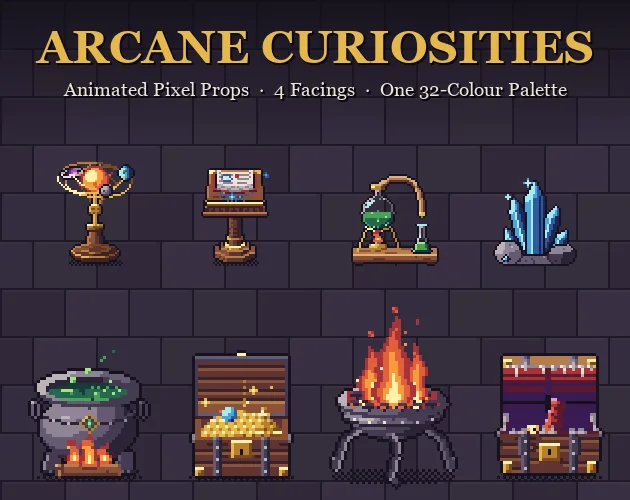 Arcane Curiosities Vol.112 animated props · 52 animations
Every sprite in these notes ships with its source
Tessarune includes all 72 Arcane Curiosities props and their full Tessarune source files as a bonus, so you can inspect, edit, and re-render every technique locally.